Developers
How to Integrate AI Agents Into Your Social Media Stack Using MCP Servers
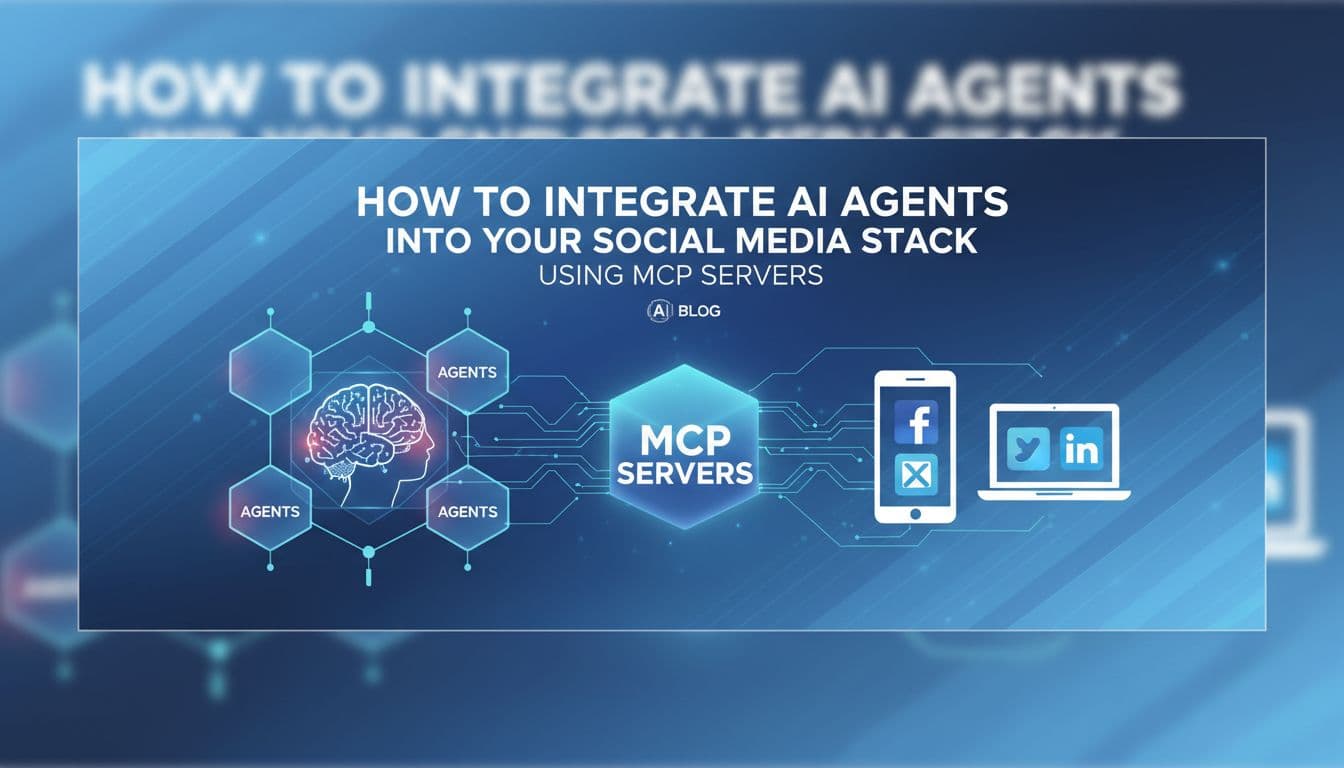
Most AI tools help you write social media posts. This article is about making AI actually post them. MCP (Model Context Protocol) is the open standard that turns a chatbot into an autonomous social media agent. It lets AI assistants like Claude and ChatGPT connect directly to platforms like Aidelly and take real actions: drafting content, scheduling posts, routing approvals, and pulling analytics. No copy-pasting. No tab-switching. No manual handoff. Only about 7 platforms in the world currently support MCP for social media, which means the marketers and developers who set this up now are running a workflow most of their competitors have never heard of. This guide breaks down what MCP is, why it matters specifically for social media, and how to connect your AI assistant to an agentic social media stack that runs end-to-end without you babysitting every step.

By Wilzer Jean-Baptiste
Published 12 min read
You have probably spent time asking Claude or ChatGPT to write a LinkedIn post, then copying the output, pasting it into your scheduler, tweaking the format, picking a time, and hitting publish. That whole process takes ten minutes. Multiply it by five posts a week across three platforms and you have a part-time job that is supposed to be automated.
The problem is not the AI. The problem is that your AI assistant has no hands. It can generate the content, but it cannot reach into your social media stack and do anything with it. There is a gap between the output and the action, and right now you are the bridge.
MCP closes that gap. It is the missing layer that turns a text generator into an agent that can actually execute inside your tools. And for social media specifically, it changes everything about how the workflow runs.
What MCP Is and Why Most Marketers Have Never Heard of It
The Open Standard Nobody Is Talking About Yet
MCP stands for Model Context Protocol. It is an open standard that lets AI assistants like Claude and ChatGPT connect directly to external tools and services, including social media platforms. Think of it as a universal plug. Instead of every AI tool building a custom integration for every platform it wants to connect to, MCP gives them a shared language. The AI assistant speaks MCP, the platform speaks MCP, and they can work together without a custom API integration built from scratch every time.
Most marketers have never heard of it. That is not surprising. MCP is still early. Anthropic published the spec in late 2024, and adoption has been picking up fast through 2025 and into 2026. But the marketing world has been slow to catch on compared to the developer community. That gap is exactly where the opportunity is.
Here is why it matters for your stack specifically. Before MCP, an AI assistant could read information and generate text. It could not take action inside another tool unless someone built a dedicated plugin or integration. MCP changes that model entirely. It gives AI agents a structured way to discover what a tool can do, authenticate, and then execute actions inside it. For social media, that means the agent does not just write a caption. It can schedule it, pick the platform, set the time, and confirm the post went live.
The practical shift here is significant. You stop being the person who moves outputs from one tool to another. The agent handles the handoff. And for anyone managing social media at volume, whether that is a solopreneur running five accounts or an agency managing fifty, that handoff is where most of the time goes.
Why This Is Different From a Regular API Integration
A REST API lets you build a connection between two systems. But building that connection takes developer time, maintenance, and a separate integration for every tool you want to connect. MCP works differently. It is a protocol, not a one-off integration. An AI assistant that supports MCP can connect to any MCP-compatible platform without a custom build for each one.
For marketers and growth operators who are not developers, this is a big deal. You do not need an engineering team to wire Claude into your social media scheduler. You point the assistant at the MCP server endpoint, authenticate, and the agent can start taking actions. The setup is closer to connecting a browser extension than deploying custom code. That accessibility is what makes MCP worth paying attention to right now, before it becomes mainstream and the early-mover advantage disappears.
The Current State of MCP Support in Social Media Tools
Only about 7 platforms in the world currently support MCP for social media. That number is not a typo. The standard is new enough that most scheduling tools have not built MCP servers yet. Some are still figuring out what MCP is. Others are watching to see if it sticks before committing engineering resources.
That means if you connect your AI assistant to an MCP-compatible platform like Aidelly right now, you are running a workflow that most of your competitors literally cannot replicate yet. They do not have access to the infrastructure. Early adopters in this space are not just saving time. They are building a compounding advantage. Every week they run agentic workflows, they are generating performance data, refining their content strategy through AI feedback loops, and reducing the manual overhead that their competitors are still paying in hours per week. The gap widens the longer they wait.
The Real Difference Between a Chatbot and an AI Agent
Suggestions Versus Actions
Here is the clearest way to think about it. A chatbot helps you write posts. An AI agent using MCP publishes them. That is not a small distinction. It is the entire difference between a tool that saves you ten minutes and a tool that removes a task from your plate entirely.
When you ask Claude to write a LinkedIn post about your product launch, it gives you a draft. Good draft. Maybe great. But then you still have to open your scheduler, paste the copy, format it for LinkedIn specifically, pick a posting time based on when your audience is active, add the image, set the approval routing if you have a team, and hit publish. That is five to eight manual steps after the AI did its job.
An AI agent connected to your social media stack via MCP handles all of those steps. You give it the brief. It drafts the post, formats it for the platform, checks your content calendar for gaps, schedules it at the optimal time based on your historical engagement data, routes it through your approval workflow if one is set, and confirms when it goes live. You get a notification. The task is done.
The difference is execution. And execution is where most social media workflows fall apart. Not because the content is bad, but because the manual steps between content creation and publishing create friction, delays, and inconsistency. An agent removes that friction entirely.
What an Agentic Workflow Actually Looks Like in Practice
Say you run a fitness coaching business and you want to post five times a week across Instagram, LinkedIn, and TikTok. With a standard AI-assisted workflow, you are still spending an hour or two a week on scheduling, formatting, and publishing even after the AI writes the copy.
With an agentic workflow connected through MCP, you give the agent a weekly brief: your content themes, any promotions running, your brand voice guidelines, and your target platforms. The agent pulls trending topics in your niche, drafts platform-specific posts for each channel, slots them into your content calendar at peak engagement windows, and queues them for review. You spend fifteen minutes approving instead of two hours producing. That is the practical version of what MCP enables. It is not about AI being smarter. It is about AI having the ability to act, not just advise.
Why Most AI-Powered Schedulers Still Are Not Agentic
A lot of social media tools have added AI features in the last two years. Most of them are AI-assisted, not agentic. There is a real difference. AI-assisted means the tool uses AI to help you do the work faster. You still make every decision and initiate every action. Agentic means the AI can complete a workflow end-to-end without you triggering each step.
The gap between those two models comes down to whether the platform has built the infrastructure for agents to operate autonomously inside it. That requires MCP support, or a comparable protocol, plus the workflow architecture to support multi-step agent tasks. Most platforms have not built that yet. Aidelly's agentic workflows are designed specifically for this. An AI agent can connect via the MCP server, access your brand voice settings and content calendar, draft posts, schedule them, and report back on performance without you sitting in the middle of every step.
How to Set Up an Agentic Social Media Workflow With MCP
The Setup Is Simpler Than You Think
Setting up MCP for social media is not as technical as it sounds. If you have ever connected a third-party app to your Google account or set up a Zapier integration, you are already comfortable with the basic concept. MCP-compatible platforms expose an MCP server endpoint. You point your AI assistant at that endpoint, go through an authentication step, and the agent gains the ability to take real actions inside your social media account.
For Claude specifically, you add the MCP server configuration to your Claude settings. You give it the server URL from the platform you are connecting to, authenticate with your account credentials or an API key, and Claude can now see and use the tools that platform exposes. For Aidelly, that means Claude can access your content calendar, draft and schedule posts across Instagram, TikTok, LinkedIn, YouTube, Facebook, and X, trigger approval workflows, and pull analytics from your connected accounts.
The authentication step is the most important part to get right. You are giving an AI agent permission to take actions inside your account, so you want to use scoped API keys where possible and review what permissions the agent actually needs. Most platforms let you set this up with read and write permissions separately, so you can give the agent scheduling access without giving it access to billing or account settings.
Once the connection is live, you can test it with a simple prompt. Ask Claude to check your content calendar for gaps this week and draft a post for the platform with the lowest recent engagement. If the MCP connection is working, it will pull your actual calendar data, look at your analytics, and return a draft it can then schedule on your behalf. That is the moment the workflow clicks. You are not asking AI to help you anymore. You are delegating to it.
The Full Content Cycle an Agent Can Run
Agentic social media workflows built on MCP can handle the full content cycle. That is not a small claim, so let me be specific about what it covers.
Ideation: the agent monitors trending topics in your niche and surfaces content ideas that match your brand positioning. Drafting: it writes platform-optimized copy for each channel, adjusting tone, length, and format for Instagram versus LinkedIn versus TikTok. Scheduling: it places posts at peak engagement windows based on your historical performance data, not a generic best-practices chart. Approval routing: it sends posts through your team review workflow before anything goes live, so a human still has eyes on the content without being the bottleneck. Analytics: after posts go live, the agent pulls performance data and uses it to refine future drafts, closing the feedback loop automatically.
That is a complete content operation running without you manually touching each step. For a solopreneur, that frees up ten or more hours a week. For an agency managing multiple clients, it changes the economics of how many accounts one person can handle well.
What to Do With the Time You Get Back
This might sound like a strange subsection for a technical article, but it is worth saying. The point of agentic workflows is not to remove you from your social media strategy. It is to remove you from the mechanical parts so you can focus on the parts that actually require your judgment.
Brand positioning decisions, creative direction, client relationships, campaign strategy: those still need a human. What does not need a human is reformatting a LinkedIn post for Instagram, picking a Tuesday 9am posting slot based on data you already have, or routing a draft through an approval queue. When an AI agent handles those steps via MCP, you get your attention back for the work that moves the needle. The goal is not a fully automated account with no human voice. The goal is a workflow where the AI handles execution and you handle strategy. That balance is what makes agentic social media actually useful rather than just technically impressive.
MCP is early. The platforms supporting it for social media right now can be counted on one hand. But the workflow it enables, where an AI agent handles the full content cycle from ideation to analytics without you bridging every step manually, is not a future concept. It is running today for the marketers and developers who have set it up. The gap between AI-assisted and agentic is the gap between saving time and reclaiming it entirely. If you are already using Claude or ChatGPT daily and you are tired of being the manual layer between AI output and social media publishing, the infrastructure to fix that exists right now. Aidelly's MCP server is one of the only places in the world where you can connect your AI assistant directly to a full social media management stack and let it run.
If you've made it this far, you already know the difference between AI that helps you write and AI that actually does the work. Aidelly is built for the second one. Its agentic workflows let your AI assistant handle the full content cycle, from drafting and scheduling to pulling performance data, without you touching a single tab. See what that looks like for your stack at aidelly.ai.
Compare social scheduling tools
Evaluating software for your content workflow? Use our buyer guides and comparisons to compare scheduling, approvals, analytics, and AI workflow fit.